

SPREADS: Seven Guidelines on Page Design for Your Book
Did you know that readers make judgments about your book’s tone and your credibility before they’ve read a single sentence?
I’m not talking about the cover now. Certainly they’ve made some judgments from that. But when those impressions were favorable enough to get them to open the book, a similar set of split-second, subconscious evaluations begin running, and continue alongside their interpretation of the words you’ve written.
When we open a book, research has shown that we form an impression of its emotional tone from glimpsing a page for only 700 milliseconds, too short a time to read more than three or four words. This is based, among other aspects of design we’ll discuss, on the “personality” that readers associate with the typeface used. Designers and researchers call this “visual rhetoric.”
Last year I wrote a book design post called Your Book Design is CRAP? That’s Great!, playing with Robin Williams’ acronym that she joked was “inappropriate.” That post focused mostly on grabbing a reader’s attention, with much of the attention on covers. This one is about keeping their attention and influencing their emotional response throughout your book.
Yes, the words you choose, the sentences you craft, and the sequence you place them in must carry your plot or deliver your message. But your book can do so more effectively when you understand and apply design principles to make the transfer of information and emotion easier on your readers.
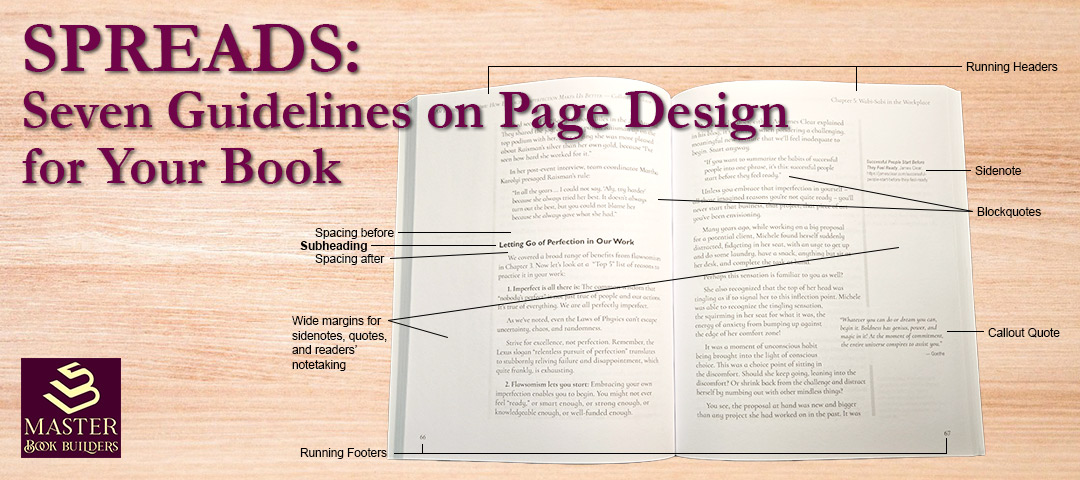
So I’ve adopted another acronym, a bit more appropriate: SPREADS. More appropriate, because a “spread” is also the term for the two facing pages you’re looking at when you open a book. That’s the right view to keep in mind when designing pages, not the single page view that most word processors show you.
Here are the SPREADS headings, so you can navigate or find the one you want to review later:
S – Spacing Speaks First
P – Pick a Voice, Not Just a Font
R – Read Your Genre’s Dress Code
E – Edges Help with Wayfinding
A – Adjacent Beats Flip and Find
D – Don’t Be a Wimp, Don’t Be a Bully
S – See It Through Readers’ Eyes, Too
I want to caution you that the research we’ll discuss does not purport to settle many questions about book design. The researchers themselves often echo Stephen Bernhardt’s 1986 essay, “Seeing the Text,” where he wrote,
“There are no hard and fast rules for designing effective visually informative texts, though empirical research has begun to offer some tentative findings.”
A major weakness across most of the research on page design, for our purposes, is that almost none has attempted to study book-length reading.
As a result, we’re talking about guidelines that are as much based on the teachings of experienced book designers as any verifiable science. And as I urged in the CRAP post, it’s valuable to learn the guidelines, follow them most of the time, and break them only when you have a clear reason to do so.
S – Spacing Speaks First
In that first split second after your reader turns to a page spread, before they can begin to decipher your words, before they even notice the typeface you’ve chosen, they see shapes. Blocks of text. Gaps between them. Margins around them. Possibly graphic elements, with their own gaps and margins.
In that moment, they are already drawing inferences about how those shapes relate to each other, how the relationships should influence the meaning about to be delivered by the text. As researcher Jeanne-Louise Moys explained,
“A document with narrow margins and limited white space between sections can appear daunting to readers, offering no entry points, and little alternative to reading the whole document from the beginning, which few readers want.”
That last bit reflects my caution about applying research conducted on shorter pieces to book design, but in this case a reader’s reaction that finds the text “daunting” is certainly not what we want for your book. Instead, we want a layout that uses spacing, including line spacing (aka, leading), to organize the text for the reader and guide their eyes through it. This produces a sense of orderliness that readers find “accessible, credible, objective, and informative.”
The researcher went on:
“The layout is characterized by a high degree of orderliness, with regularly spaced columns and graphic objects. This sense of orderliness is reinforced by the use of rules and boxes and the even distribution of space throughout the layout.”
One trick I learned long ago is to look at a page or spread and squint until the text blurs into those blocks and shapes your reader will see in that first split second. How does that view make you feel? Do you sense an organization to the material? Are the margins comfortable and do you see running headers, page numbers, sidenotes, or callouts in them? Does the spacing around a subheading tell you which block it’s connected to?
That last question brings up a specific tip: put slightly more space above your subheadings than below them. This creates a subtle cue for the reader that one section has ended, perhaps with a pause to digest the point, and a new one is about to begin with the subheading announcing what’s next, connected to the following text with a smaller line space (often the same as, or very close to, the main text leading).
A split second later, still before reading anything, the reader will notice the fonts you’ve chosen.
P – Pick a Voice, Not Just a Font
The body or main text typeface you choose becomes the narrator’s voice for your book. It’s what your reader hears for the next 200 pages. And they do hear it.
We noted at the outset that readers ascribe a personality to the fonts they see on your page, with the study showing readers sorting 15 typefaces using 20 personality traits into three personality categories: elegant, direct, and friendly. The research also shows that the initial personality can shift as they get into reading if they find the text does not match their initial reaction. Others studies have reached conflicting results in the debates over serif vs. sans serif fonts, the impact of pairing them for body and heading text, whether and when to use decorative fonts, and so on.
So, while the research clearly tells us to pay attention to choosing a font that matches the tone or personality we want our text to display, it doesn’t tell us which font(s) to choose.
Turning to what designers have learned, Robert Bringhurst wrote in The Elements of Typographic Style:
“Letterforms have tone, timbre, character, just as words and sentences do. The moment a text and a typeface are chosen, two streams of thought, two rhythmical systems, two sets of habits, or if you like, two personalities, intersect.”
To narrow the choices, I’ll state my preference for serif fonts for the body text in printed books. I agree with Matthew Butterick’s advice:
“Though I’ll stop short of calling it a rule, I strongly recommend using a serif font — not a sans serif font — for body text in print. Most books, newspapers, and magazines use serif fonts for body text. It’s the traditional choice and still the best choice.”
To narrow the choices further, I suggest spending some time looking at the fonts in books in your genre. Pay attention to how the body text fonts match up with the way the various texts make you feel. When you find fonts that match the personality you’re going for, take note of their features, such as the roundness of o, c, e; x-height (height of lower case letters with no ascenders or descenders, like a, c, e, or x); ratio of x-height to the ascenders and descenders like b, d, q, y; style of punctuation and special characters like quotation marks, question marks, and the ampersand. I personally dislike number sets where some digits are lower case height and others have ascenders or descenders, so I avoid fonts with those.
When you find a few serif and sans serif fonts that could work with your book, Butterick shares some useful tips and tools for identifying them.
I ask our clients to go through this exercise of finding 5 or 6 books in their genre with page layouts, font choices, and overall interior designs they admire and explain why in a few sentences. A preliminary step that can help you zero in when looking at others’ books is to describe your book’s voice in three adjectives: Warm, wry, practical. Authoritative, calm, precise. Wise, supportive, friendly. Mysterious, suspenseful, moving. Professional, scholarly, confident.
Some of these adjectives are taken from the list used in the typeface personality study mentioned above, so they’ve been tested as ways readers feel about fonts. How do you want your font choices to make your readers feel?
R – Read Your Genre’s Dress Code
Every book genre has what we’ll call a dress code and readers experienced in that genre know it on sight. As Moys put it: “visual language clings to a genre like a magnet.”
Here we’re looking at the combination of design choices. For example, in another study, Moys showed three different layouts where the main difference was in the differentiation between headings and main text. Where the headings were very much larger that the main text, participants described them as “attention-grabbing, casual, sensationalist, or young.” When the headings were moderately larger, they used words like “formal, informative, professional, and serious.” The least differentiated document was associated only with the descriptor “calm.”
Moys concluded:
“While the high differentiation documents may be more eye-catching, moderate and low differentiation documents are more likely to be taken seriously and considered reputable.”
Findings like these tell us again that design matters. Going back to the CRAP post, the R – Repetition is how these choices become a dress code: using the same style and spacing for subheadings, running headers, chapter title pages, key points summaries, and the many other elements in your book — emulating other books in your genre.
You can break the dress code. Just make sure if you do, it’s on purpose and readers will understand your purpose.
E – Edges Help with Wayfinding
Every reader eventually asks: Where am I? The answers live at the edges, in running headers, page numbers, and chapter openings. We might also consider wayfinding tools like the table of contents as being at the front “edge” of the book and an index at the back.
The research here is thin. In one small study, four expert readers evaluated book prototypes. In the printed books, they relied most on chapter headings, then on page numbers, then on the feel of the book itself. Running headers came last; the experts called them useful, but used them less.
The participants did note that which tool they used depended on the timing and purpose of their need to find their place. During a first reading, page numbers and chapter headings were used most. But when returning to the book to find a passage or specific information, they indicated varied techniques like flipping through looking for a graphic.
I’ve written before about how writing notes in the margins as I read helps create a kind of mental map of where a certain passage appeared, marking it first within the thickness of the book, then on which side of the spread, and sometimes even at the top, middle, or bottom part of a page. Page layout helps with this when well-designed subheadings, sidenotes, graphics, and margins that encourage notetaking add signposts to my mental map.
That fits what designers tell us: Navigation should be easy to find when needed, and easy to ignore the rest of the time. Edward Tufte’s chapter on “Layering and Separation” in Envisioning Information makes the case that a well-designed display puts information on visual layers, so the reader can attend to one layer while the others recede. On a book page, the text is the top layer. Running heads and page numbers belong on a quieter layer below it; smaller, lighter, perhaps in small caps or italic, set in the same place on every page, and far enough away from the text block that they never get mistaken for part of it.
How much navigation you need depends on how your book will be read. A novel read front to back can get by with very little. A how-to book, a reference book, or a business book that readers will dip into and come back to needs much more. Yvonne covers the conventions of what goes where in Running Headers and Widows and Orphans, Oh My!, so I won’t repeat them here.
Try the flip test. Riffle through your print proof fast and stop at random. Can you tell which chapter you’re in without reading a line of body text? If you can, the edges are doing their job. If the running head is the first thing you notice on the page, it’s probably doing too much. Better to solve that at the beginning of the design phase, eh?
A – Adjacent Beats Flip and Find
Notes, figures, captions, tables, and sidebars all ask readers to look away from the text, and the farther away they are, the longer it takes for the reader to find the reference and find their way back.
Tufte puts it best: information should be “adjacent in space rather than stacked in time.” A figure on the same spread as the passage that discusses it is adjacent in space. A figure three pages later makes the reader flip, find, and then find their place again.
That’s why I’m a fan of sidenotes, as I wrote in Page Layout: Designing for Marginalia, Tufte’s own books use them generously, and once you’ve read a book that way, endnotes start to feel like a scavenger hunt. I’ll admit this guideline rests on craft, not studies of book readers, but it follows the same proximity principle as the research-backed Spacing guideline above.
When it comes to graphics, charts, tables, images, I’ve been touting this principle for decades. In a 2003 article written for lawyers, I quoted an appellate lawyer advising that when there is a picture in the evidence that illustrates an important point,
“reproduce it in the body of your brief. Locate it in that area where the issue is discussed. Don’t make the court dig through a cumbersome record to find it.”
Tufte puts this one tersely: “Words and pictures belong together.”
Search your manuscript for every “see” figure reference, or note number, and ask whether whatever it points to could sit on the same spread. When it can’t, as with long endnotes, make the trip effortless, by grouping references in the notes section under chapter headings that tell readers which chapter they should go back to.
D – Don’t Be a Wimp, Don’t Be a Bully
Headings should differ from the body text. The question is how much.
In the CRAP post, I argued contrast should be “very different,” and as Yvonne will tell you, wimpy contrast is one of my pet peeves. My guru,Tufte, seems to say the opposite: “Make all visual distinctions as subtle as possible, but still clear and effective.” He calls it the smallest effective difference.
Readers settle this apparent disagreement. A study compared readers’ and designers’ ranking of six style characteristics of headings. Both ranked bold first as “the most easily identifiable” style choice. The designers ranked spacing as the second most useful method, but the readers ranked it fifth. One way to look at this is that when spacing was the only change in style, so that the heading text was the same size, weight, and style as the body text, the difference felt too subtle for most readers to notice. The key word in Tufte’s rule is “effective,” and that means effective for readers.
An apparent flaw, for me, in the study’s spacing findings is that the text shown to the participants had extra spacing above the heading in all examples. But in the one example used to rank spacing, it only varied the spacing below the heading. As I noted in the tip in the Spacing guideline, I’m with the designers on this one and this study doesn’t change my view. I recommend adding spacing more above the heading and only slightly below it.
Other than spacing, both groups ranked the rest of the style choices in the same order: size, sans serif, capitalization, and italics. The message seems clear, use bold as your first choice for making your headings stand out, then size, and then sans serif. I generally use all three in combination, along with spacing. As advised in the CRAP post, don’t be a wimp.
But don’t be a bully, either. You’ll note I didn’t suggest using all-caps and both the designers and readers in the study above ranked it low on the list. In the Moys study, readers heard all-caps as “shouting” and described it as “patronizing.”
A good test: if a reader in a hurry can’t spot your subheads, they’re wimpy. If they’re louder than your sentences, they’re bullies.
S – See It Through Readers’ Eyes, Too
The thread running through all this research is that designers and readers may not see the same page. Designers aren’t wrong. Their eyes are trained to see differences most readers miss, which is why a designer’s eye alone isn’t enough.
The research has a blind spot, too: most of it was done with Western readers, often students, looking at typefaces and layouts in isolation rather than at real book pages. Your readers may not be those readers. Remember these are guidelines, not rules.
So trust your eye, and your designer’s. Then check with some readers. You can get reactions from your beta readers. But you may want to run a test early in the design process, if you have a couple of design options you’re considering:
- Export two versions of a sample spread at actual trim size (e.g., a PDF export from InDesign).
- Show them to three to five people who read the kind of book you’re writing.
- Ask which looks more like your book, and why.
You’ll learn more in 20 minutes than in a week of reading typography blogs (present company excepted, of course).
What the Research Can’t Tell You
Yes, readers notice typefaces and layouts, and judge personality and credibility by them. Spacing shows structure. Moderate, consistent design reads as trustworthy.
What research can’t tell you is which typeface to choose, how much space your headings need, or whether a deliberate rule-break will land. Those are judgment calls.
One of the researchers warned that “practitioners’ lore often falls short of the mark because it typically ignores the interactions between visual and verbal rhetoric.” That’s fair warning to designers like me. The best antidote I know is to keep the research in mind, the reader in view, and your eye on the whole spread.
SPREADS, once more:
- S – Space Speaks First. Show structure with space, then confirm it with type.
- P – Pick a Voice, Not Just a Font. Choose a typeface that sounds like your book.
- R – Read Your Genre’s Dress Code. Look like you belong, and break the code only on purpose.
- E – Edges Do the Wayfinding. Make navigation easy to find and easy to ignore.
- A – Adjacent Beats Flip and Find. Keep supporting material close to what it supports.
- D – Don’t Be a Wimp, Don’t Be a Bully. Make headings different enough for readers, and no louder.
- S – See It Through Readers’ Eyes. Trust your eye, and your designer’s, then check theirs.
What books have interiors you admire, and how do they make you feel? Tell me in the comments. And if you’d like a second pair of eyes on your book’s pages, Yvonne and I would love to hear from you.


Leave a Reply