

One AI Tool (that works!) for Authorpreneurs
We’ve written quite a few times about the pros — and the many pitfalls — of the major AI tools available to help authors in their research, writing, and marketing tasks. Mostly, we’ve focused on those that generate text outputs. Those I’ve tested for graphics or video so far seemed (to me, as least) to take far more time and iteration to get a decent result than I can do myself with stock imagery in Photoshop or Canva.
But this week I’ve been playing with a tool that’s focused specifically on creating headshots and short video clips for authors to use in their marketing. It’s called, appropriately, AuthorHeadshots.com.
Oh, and despite the name, you’ll likely see immediately that it can be useful for anyone in business who needs marketing images and videos.
How AuthorHeadshots Works
The online tool takes a few simple steps to generate dozens themed photoshoot-style images. First, you upload 4-8 images of yourself, or a client, or a character from your book. For characters, you can also start with text prompts, if you don’t yet have images from past book covers, for example.
These images are used to “train” the AI on what you look like, primarily your head, so they just need to be clear photos with decent lighting. I used a range of selfies and past photos of Yvonne and myself to generate ours. Once you’ve uploaded these images, select the male or female model, and the training step takes a click and about ten minutes.
When your AI model is trained, you have multiple ways to generate images, from custom text prompts, to custom poses with your own book, to a range of themed “collections” (e.g., Author, Podcaster, Speaker, Professional, Casual, Outdoors, Superhero, and more) to the full library of hundreds of preset poses.
A Sampling of Headshots
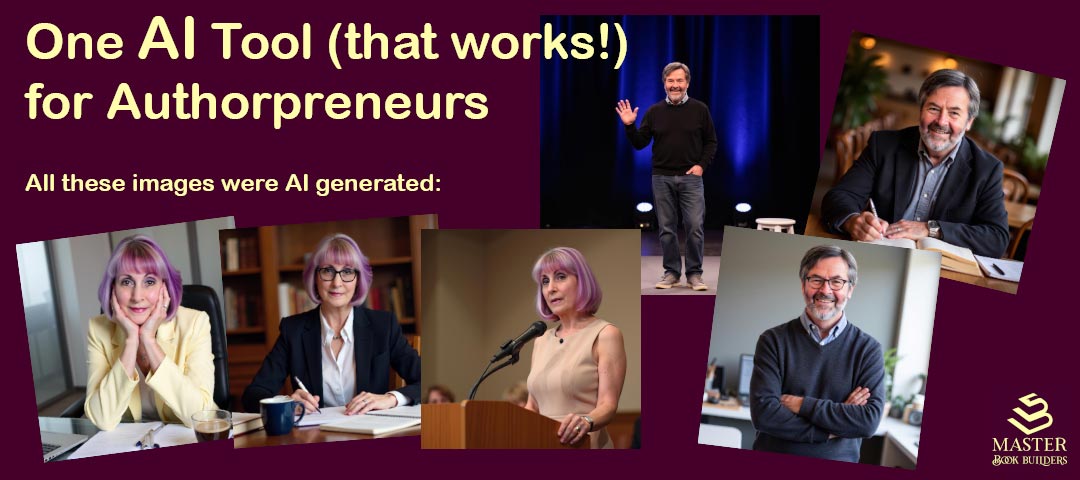
I used the Author, Speaker, and Business Casual collections to generate these for Yvonne and myself:


And Video Clips, too!
And once I’d generated the images, I was just one more click to turn any of them into a 5-second video clip. Here are some examples, the still image on the left and video clip from that image on the right:


And Character Images?
I’ve only started playing with the AI tool’s character creation features, so I started with one where we’ve already got the basic image in place. The key benefit of this capability touted by AuthorHeadshots in its marketing is being able to create lots of consistent images your character for use on covers and marketing over time and across books in a series.
When Andrew Segal came to us with the third book in his Tammy Pierre series, he already had a cover designer who’d captured the way Tammy should look in Andrew’s mind. So when we then helped him go back and release his Author’s Edition of Book One, The Lyme Regis Murders, the new cover featured Tammy on the front. And Book Two, The Black Candle Killings, has another shot of her on the back.


So I uploaded a few of the Tammy images the designer had made, selected the female model, and clicked the button to train the AI. After the 10-minute training was complete, I selected from the Casual, Outdoors, Fitness, and Superhero collections and got these (and many more) still images:


Recognize Tammy across the images?
And with one more click each, I — er, the AI — made these video clips:
What do you think? Could this tool be useful in your book business, saving you a lot of time and money on photo and video shoots?
There are more bells and whistles in AuthorHeadshots, but I suggest you check it out for yourself.


Leave a Reply